
Correct Prompts For ChatGPT
2026-06-17
🤖 How To Prompt ChatGPT For Better Results
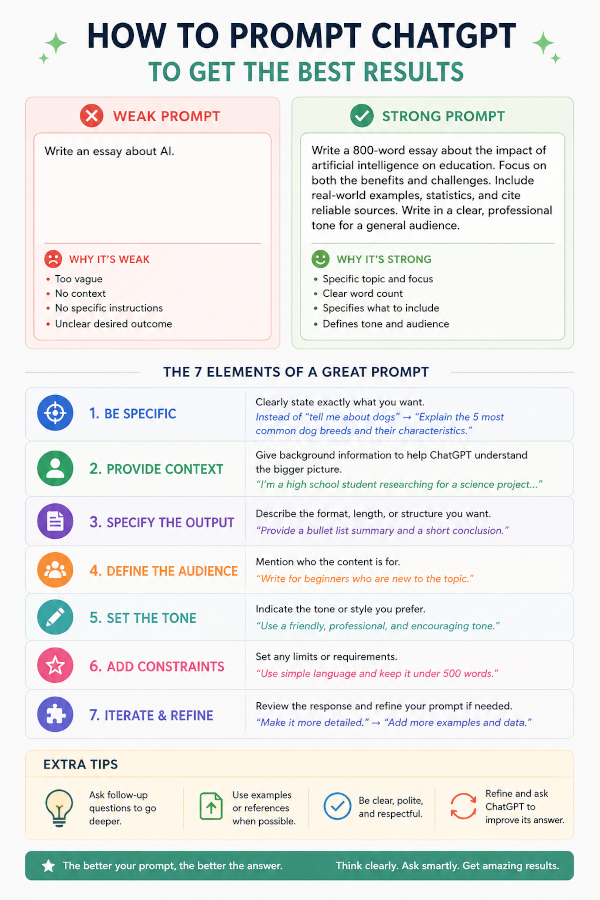
“The quality of the answer is often determined by the quality of the question.”
Many people try ChatGPT once or twice and conclude that it is inaccurate, confusing, or not particularly useful. In most cases the problem is not the AI—it is the prompt.
Think of ChatGPT as a highly intelligent assistant with no knowledge of what is inside your head. The more information you provide, the better the response becomes.
This guide explains how to write prompts that consistently produce useful, detailed, and accurate results.
🎯 The Golden Rule
Instead of asking:
Tell me about Linux.
Ask:
Explain Linux Mint, MX Linux, and Debian to a retired Windows user who wants a stable operating system. Compare advantages and disadvantages in a simple table.
The second prompt provides:
✅ Context
✅ Audience
✅ Scope
✅ Desired format
✅ Clear objective
The result will be dramatically better.
🔑 The Seven Parts Of A Great Prompt
1. Be Specific
Vague questions produce vague answers.
Poor Prompt
Write about science fiction.
Better Prompt
Write a 1,500-word article about military science fiction, including examples from classic and modern novels.
The AI now knows:
- Topic
- Length
- Focus
- Desired outcome
2. Provide Context
ChatGPT performs best when it understands your situation.
Poor Prompt
Explain Markdown.
Better Prompt
Explain Markdown to a retired author who publishes articles on GitHub Pages using Jekyll.
Now the answer can be tailored to your needs.
3. Define The Format
Tell ChatGPT exactly how you want the information presented.
Examples:
- Bullet list
- Table
- Markdown article
- Tutorial
- Checklist
- Devotional
- Blog post
- FAQ
Example
Create a Markdown tutorial with step-by-step instructions and code blocks.
4. Identify Your Audience
Who will read the content?
Examples:
- Beginners
- Children
- Pastors
- Linux users
- Developers
- Pensioners
- Students
Example
Explain artificial intelligence to a 12-year-old using simple language and practical examples.
5. Specify The Tone
The same information can be delivered in many different styles.
Possible Tones
📖 Educational
🎩 Professional
😊 Friendly
🤣 Humorous
✝️ Devotional
📰 Journalistic
⚔️ Motivational
Example
Write in a friendly and encouraging tone.
6. Add Constraints
Constraints help the AI focus.
Examples:
- Maximum word count
- Minimum word count
- Use Markdown
- Avoid technical jargon
- Include examples
- Use emojis
- Include Scripture references
Example
Create a devotional of at least 2,000 words using Markdown, Scripture references, practical applications, emojis, and a closing prayer.
7. Refine The Result
The first answer does not have to be the final answer.
Think of prompting as a conversation.
You can say:
Expand point three.
Or:
Rewrite this for beginners.
Or:
Add more examples.
Or:
Turn this into a GitHub Pages article.
Each refinement improves the result.
🚀 A Prompt Formula That Almost Always Works
A simple formula is:
Role + Task + Context + Format + Constraints
Template
Act as a [ROLE].

Your task is to [TASK].

Context:
[BACKGROUND INFORMATION]

Output format:
[FORMAT]

Requirements:
[CONSTRAINTS]
Example 1: Writing
Act as a professional science-fiction editor.

Your task is to critique my short story.

Context:
The story is intended for readers who enjoy military science fiction.

Output format:
Markdown report.

Requirements:
Identify plot holes, pacing issues, character weaknesses, and suggest improvements.
Example 2: Linux
Act as an experienced Linux systems administrator.

Your task is to explain how to back up MX Linux.

Context:
The user is a retired author who needs reliable backups.

Output format:
Step-by-step tutorial.

Requirements:
Use simple language and include terminal commands.
Example 3: Bible Study
Act as a Bible teacher.

Your task is to explain Romans Chapter 8.

Context:
The audience consists of mature Christians.

Output format:
Markdown article.

Requirements:
Include practical applications and historical background.
🔥 Advanced Prompting Techniques
Ask For Examples
Instead of:
Explain Docker.
Try:
Explain Docker and provide three real-world examples.
Ask For Comparisons
Instead of:
Tell me about KDE.
Try:
Compare KDE Plasma, XFCE, and GNOME in a table showing memory usage, customization, and ease of use.
Ask For Step-By-Step Instructions
Instead of:
How do I install software?
Try:
Provide a step-by-step guide for installing software on MX Linux using APT and Flatpak.
Ask The AI To Think Like An Expert
Examples:
- Teacher
- Engineer
- Historian
- Linux Administrator
- Chef
- Pastor
- Novelist
- Editor
Example:
Act as an experienced science-fiction editor and critique my manuscript.
⚠️ Common Prompting Mistakes
Being Too Vague
❌ Tell me about AI.
✅ Explain how AI assists authors writing science fiction.
Not Defining Output Format
❌ Explain Git.
✅ Create a Markdown tutorial explaining Git for beginners.
Expecting Mind Reading
ChatGPT does not know:
- Your goals
- Your audience
- Your experience level
Unless you tell it.
Asking Too Many Unrelated Questions
❌
Explain Linux.
Write a poem.
Create a recipe.
Compare cars.
✅ Break large tasks into smaller prompts.
💡 The Secret Most People Miss
ChatGPT works best when treated as a collaborator rather than a search engine.
Don’t just ask one question.
Have a conversation.
Ask:
- Why?
- How?
- Can you improve that?
- Give me alternatives.
- Show examples.
- Explain in simpler terms.
Each interaction improves the quality of the result.
🎯 Final Thoughts
The difference between an average answer and an excellent answer often comes down to the prompt.
Remember these seven principles:
🔑 Be Specific
🔑 Provide Context
🔑 Define The Format
🔑 Identify The Audience
🔑 Set The Tone
🔑 Add Constraints
🔑 Refine The Result
Master those seven skills and ChatGPT becomes a powerful assistant for writing, learning, programming, research, devotionals, and creative projects.
The better your prompt, the better your result.
Happy prompting! 🚀